
...
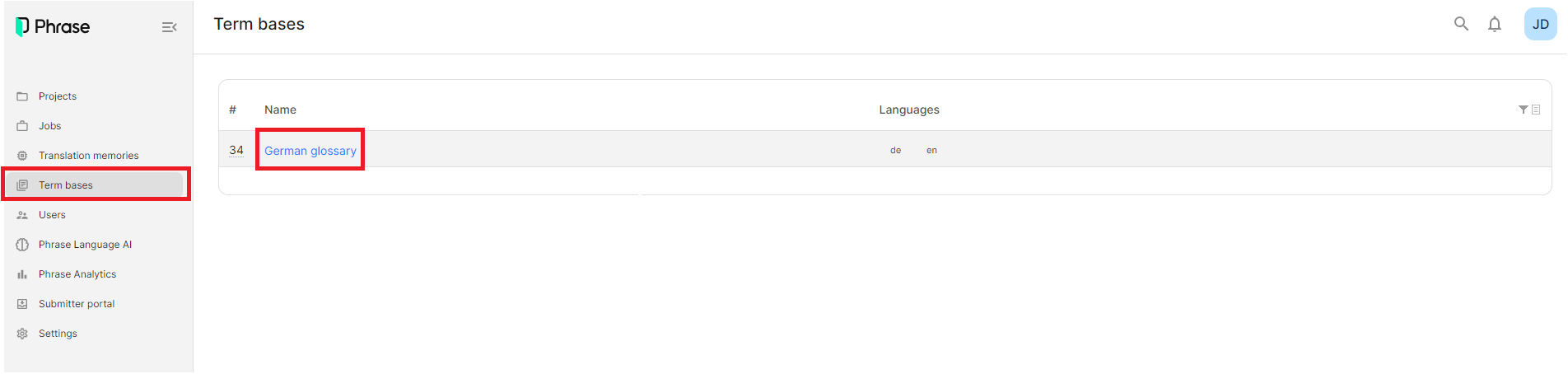
Alternatively, you can add terms by going to "Term bases" in the left-hand navigation and then selecting the glossary for your language.
Next, click on "New concept group" to add a new term pair.

Then add an English term and the equivalent translation in your language. Then click "Add".

You can make changes to the saved terms or add additional information by clicking on the term that you would like to change. You can also delete terms or add to existing terms, by clicking on the icons that appear when hovering over a term.Alternatively, click on the three dots at the end of the row and choose either "Edit term" or "Delete term".

You can add a range of details to all terms by clicking on a term. You can add information such as their "Status", "Part of speech", "Gender" and more. Once you have edited the information, please click "Save" at the bottom of the page.
...
If you would like to add a list of terms, you can do that by using the "Import" button and uploading an Excel sheet with two columns. For further details, please get in touch with Judith (jdeppe@cochrane.org).
While translating, you will see terms that are included in the glossary (term base), marked in yellow in the English source text. In the CAT panel on the right-hand side, terms from the glossary (term base) are marked with a yellow TB. The red TB label stands for forbidden terms (see screenshot below).
...